

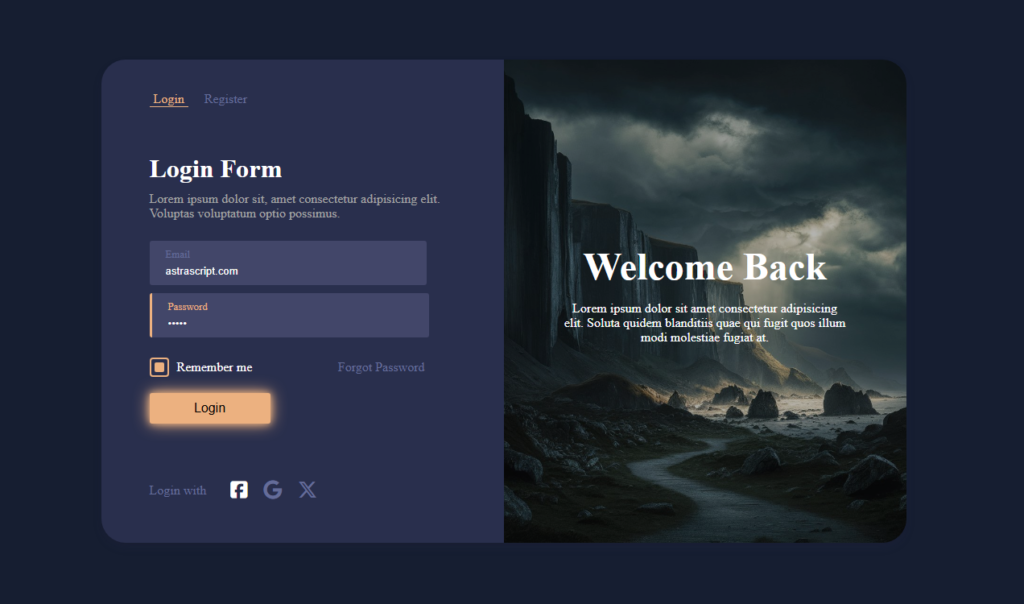
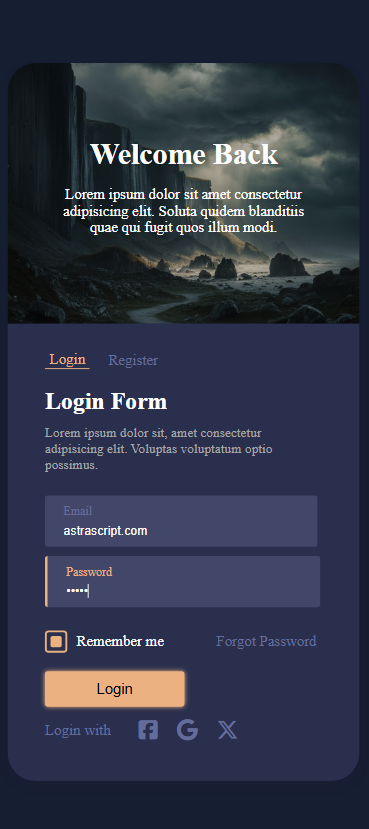
Günümüz dijital çağında, bir kullanıcının bir web sitesiyle ilk etkileşimi genellikle giriş sayfası aracılığıyla olur. Bu deneyimi görsel olarak çekici, işlevsel ve erişilebilir hale getirmek oldukça önemlidir. Bu blog yazısında, modern bir UI tasarımına sahip, odak geliştirici animasyonlarla zenginleştirilmiş ve tamamen HTML ile CSS kullanılarak oluşturulmuş bir login formu tasarlayacağız. Yazının sonunda, hem kullanış lı hem de SEO uyumlu bir login sayfasına sahip olacaksınız.
Login Formlarında Tasarım Neden Önemlidir?
İyi tasarlanılmış bir login formu:
- Kullanıcı deneyimini geliştirir.
- Profesyonelliği ve güveni artırır.
- Markanızın estetiğine uyum sağlar.
- Kullanıcı bağlılığını artırabilir.
Login formumuz, minimal ama çekici bir tasarım anlayışıyla, etkili odak animasyonları ve hover efektleriyle zenginleştirilmiştir.
Kod: Login Formunuzu Oluşturun
İşte modern tasarıma sahip login formunun tüm HTML ve CSS kodları.
Login Form HTML Kodu:
<!DOCTYPE html>
<html lang="en">
  <head>
    <meta charset="UTF-8" />
    <meta name="viewport" content="width=device-width, initial-scale=1.0" />
    <link rel="stylesheet" href="style.css" />
    <link
      rel="stylesheet"
      href="https://cdnjs.cloudflare.com/ajax/libs/font-awesome/6.7.1/css/all.min.css"
      integrity="sha512-5Hs3dF2AEPkpNAR7UiOHba+lRSJNeM2ECkwxUIxC1Q/FLycGTbNapWXB4tP889k5T5Ju8fs4b1P5z/iB4nMfSQ=="
      crossorigin="anonymous"
      referrerpolicy="no-referrer"
    />
    <title>Document</title>
  </head>
  <body>
    <div class="login-container">
      <div class="left-area">
        <div class="link">
          <a href="login.html" class="active">Login</a>
          <a href="register.html">Register</a>
        </div>
        <div class="form">
          <div class="form-top">
            <h1>Login Form</h1>
            <p>
              Lorem ipsum dolor sit, amet consectetur adipisicing elit. Voluptas
              voluptatum optio possimus.
            </p>
          </div>

          <form action="">
            <div class="input-area">
              <input type="email" placeholder="ghfjW@example.com" />
              <span>Email</span>
            </div>
            <div class="input-area">
              <input type="password" placeholder="enter your password" />
              <span>Password</span>
            </div>

            <div class="form-bottom">
              <div class="checkbox">
                <label class="checkbox-container">
                  <input type="checkbox" checked />
                  <div class="custom-checkbox"></div>
                  Remember me
                </label>
              </div>
              <a href="#" class="forgot-password">Forgot Password</a>
            </div>

            <button type="submit" class="login-btn">Login</button>
          </form>
        </div>
        <div class="social">
          <p>Login with</p>
          <div class="social-media">
            <div class="social-icon">
              <i class="fa-brands fa-square-facebook"></i>
            </div>
            <div class="social-icon">
              <i class="fa-brands fa-google"></i>
            </div>
            <div class="social-icon">
              <i class="fa-brands fa-x-twitter"></i>
            </div>
          </div>
        </div>
      </div>
      <div class="right-area">
        <div class="welcome">
          <div class="welcome-text">
            <h2>Welcome Back</h2>
            <p>
              Lorem ipsum dolor sit amet consectetur adipisicing elit. Soluta
              quidem blanditiis quae qui fugit quos illum modi molestiae fugiat
              at.
            </p>
          </div>

        </div>
      </div>
    </div>
  </body>
</html>
Login Form CSS Kodu:
body{
    background-color: #161e31;
    height: 100vh;
    display: flex;
    justify-content: center;
    align-items: center;
    color: white;
}
.login-container{
    box-shadow: rgba(50, 50, 93, 0.25) 0px 6px 12px -2px, rgba(0, 0, 0, 0.3) 0px 3px 7px -3px;
    width: 1000px;
    height: 600px;
    background-color: #292f4d;

    border-radius: 30px;
    -webkit-border-radius: 30px;
    -moz-border-radius: 30px;
    -ms-border-radius: 30px;
    -o-border-radius: 30px;
    display: flex ;
    justify-content: space-between;
    align-items: center;
}
.link{
    display: flex;
    gap: 20px;
    align-items: center;
}
.link a{
    text-decoration: none;
    color:#646c99;
    transition: .2s all ease;
    -webkit-transition: .2s all ease;
    -moz-transition: .2s all ease;
}
.active{
    padding-left: 5px;
    padding-right: 5px;
    color: #ecb180 !important;
    border-bottom: 1px solid #ecb180;
}
.link a:hover{
    color: #ecb180;
}
.left-area{
    padding: 40px 60px;
    height: -webkit-fill-available;
    width: 50%;
    display: flex;
    flex-direction: column;
    justify-content: space-between;

}
.right-area{
    position: relative;
    background-image: url('dark1.jpeg');
    background-size: cover;
    background-position: center;
    height: -webkit-fill-available;
    width: 50%;
    padding: 40px 60px;
    border-radius: 0 30px 30px 0;
    -webkit-border-radius: 0 30px 30px 0;
    -moz-border-radius: 0 30px 30px 0;
    -ms-border-radius: 0 30px 30px 0;
    -o-border-radius: 0 30px 30px 0;
}
.input-area{

    position: relative;
}
.input-area span{
    font-size: .8rem;
    color: #646c99;
    position: absolute;
    top: 15px;
    left: 20px;
    transition: .2s all ease;
    -webkit-transition: .2s all ease;
    -moz-transition: .2s all ease;
    -ms-transition: .2s all ease;
    -o-transition: .2s all ease;
}
input{
    color: white;
    background-color: #424669;
    width: 80%;
    padding: 30px 20px 10px 20px;
    margin: 5px 0;
    border-radius: 3px;
    border: none;
    outline: none;
    -webkit-border-radius: 3px;
    -moz-border-radius: 3px;
    -ms-border-radius: 3px;
    -o-border-radius: 3px;
    transition: .1s all ease;
    -webkit-transition: .1s all ease;
    -moz-transition: .1s all ease;
    -ms-transition: .1s all ease;
    -o-transition: .1s all ease;
}
input:focus{
    border-left:3px solid #ecb180;
}
.input-area input:focus ~ span {
    color: #ecb180 !important;
    left: 23px;
}
.form-top{
    display: flex;
    flex-direction: column;
    gap: 10px;
}
.form-top h1 , .form-top p{
    margin: 0;
}
.form-top p{
    color:rgb(165, 165, 165);
    margin-bottom:20px ;
}
.form-bottom{
    width: 90%;
    margin-top: 20px;
    margin-bottom: 20px;
    display: flex;
    justify-content: space-between;
    align-items: center;
}
.checkbox{
    display: flex;
    align-items: center;
    justify-content: center;
}

.checkbox-container {
    display: flex;
    align-items: center;
    gap: 10px;
    cursor: pointer;
}

.checkbox-container input[type="checkbox"] {
    display: none; /* Hide the default checkbox */
}

.custom-checkbox {
    width: 20px;
    height: 20px;
    border: 2px solid #ecb180;
    border-radius: 4px;
    display: flex;
    justify-content: center;
    align-items: center;
    transition: all 0.3s ease;
}

.custom-checkbox:hover {
    box-shadow: 0 0 8px rgba(240, 178, 127, 0.6);
}

.custom-checkbox::after {
    content: '';
    width: 12px;
    height: 12px;
    background-color: #ecb180;
    display: none;
    border-radius: 2px;
}

.checkbox-container input[type="checkbox"]:checked + .custom-checkbox::after {
    display: block; /* Show the checkmark */
}

.forgot-password{

    text-decoration: none;
    margin: 0;
    color: #646c99;
    transition: .2s all ease;
    -webkit-transition: .2s all ease;
    -moz-transition: .2s all ease;
    -ms-transition: .2s all ease;
    -o-transition: .2s all ease;
}
.forgot-password:hover{
    color: #ecb180;
}


.login-btn{
    font-size: 1rem;
    font-weight: 500;
    width: 150px;
    padding: 10px ;
    border-radius: 3px;
    border: none;
    outline: none;
    -webkit-border-radius: 3px;
    -moz-border-radius: 3px;
    -ms-border-radius: 3px;
    -o-border-radius: 3px;
    cursor: pointer;
    background-color: #ecb180;
    animation: glow 4s infinite;
    -webkit-animation: glow 4s infinite;
}


@keyframes glow {
    0% {
        box-shadow: 0 0 5px #ecb180;
    }
    50% {
        box-shadow: 0 0 10px #ecb180, 0 0 20px #ecb180;
    }
    100% {
        box-shadow: 0 0 5px #ecb180;
    }
}

.social{
    color: #646c99;
    display: flex ;
    align-items: center;
    gap: 30px;
}

.social-media{
    display: flex;
    gap: 20px;
}
.social-media i{
    cursor: pointer;
    font-size: 1.5rem;
    transition: .2s all ease;
    -webkit-transition: .2s all ease;
    -moz-transition: .2s all ease;
    -ms-transition: .2s all ease;
    -o-transition: .2s all ease;
}
.social-media i:hover{
   color: white;
}

.welcome{
    top: 0;
    left: 0;
    width: 100%;
    height: 100%;
    position: absolute;
    background-color: rgba(22, 22, 22, 0.3);
    display: flex;
    justify-content: center;
    align-items: center;
    flex-direction: column;
    border-radius: 0 30px 30px 0;

}
.welcome-text{
    text-align: center;
    width: 70%;
}
.welcome-text h2{
    margin: 0;
    font-size: 3rem;

}

@media screen and (max-width: 800px) {
    .login-container{

        flex-direction: column-reverse;
        width: 100%;
        height: 100%;
        border-radius: 20px ;
        -webkit-border-radius: 20px ;
        -moz-border-radius: 20px ;
        -ms-border-radius: 20px ;
        -o-border-radius: 20px ;
}
    .right-area{
        width:-webkit-fill-available;

        border-radius: 20px 20px 0 0;
        -webkit-border-radius: 20px 20px 0 0;

}
    .left-area{
        padding: 30px 40px;
        width: -webkit-fill-available;
    }
    .left-area h1{
        padding-top: 20px;
    }
    .input-area input{
        width: -webkit-fill-available;
    }
    .form-bottom{
        width: -webkit-fill-available;
    }
}
Sonuç
Modern tasarım prensipleriyle ve SEO en iyi uygulamalarıyla login formumuzu oluşturduk. Bu formu web sitenizde uygulayarak kullanıcı deneyimini geliştirin ve görünürlülüğünü art
